My JLab JBuds Lux ANC headphones could only be controlled from a phone app. I decompiled the Android app, recovered the JieLi RCSP protocol and its native authentication, reimplemented both in Python, and built a native KDE app, a CLI, a background service and global shortcuts for noise cancelling, EQ and every other setting.
- 0
- technologies
- 0
- shipped features
- 0
- screens
- 0
- decisions logged
No public repository for this project
5 sections below
The JBuds Lux ANC's noise cancelling, EQ, volume limit, Clear Voice and touch controls are only exposed through JLab's Android app. On a Linux laptop the earbuds play audio fine, but none of those settings can be reached. This project closes that gap without touching the audio path.
Finding the protocol: I pulled the APK and decompiled it with JADX. The model maps to device pid 17 on a JieLi chip, which means the app speaks JieLi's RCSP protocol over classic Bluetooth SPP, not BLE. I traced the frame format through ParseHelper (FE DC BA | flags | opcode | length | body | EF), the system-info attributes (battery, EQ, noise mode) and JLab's own custom opcode (0xFF), and checked everything against bytes captured from the phone's Bluetooth logs and from the real headphones.
Breaking the handshake: the earbuds refuse commands until a challenge-response authentication succeeds, and that lives in native code (libjl_bluetooth.so). I loaded the ARM64 library into the Unicorn CPU emulator and called its E1 function directly, which identified it as Bluetooth's standard E1 (SAFER+) with a fixed key and address stored in the library's .data section. I then reimplemented SAFER+ in pure Python (auth.py) and verified it matches the native code 20 out of 20 times, and against live challenges from the device.
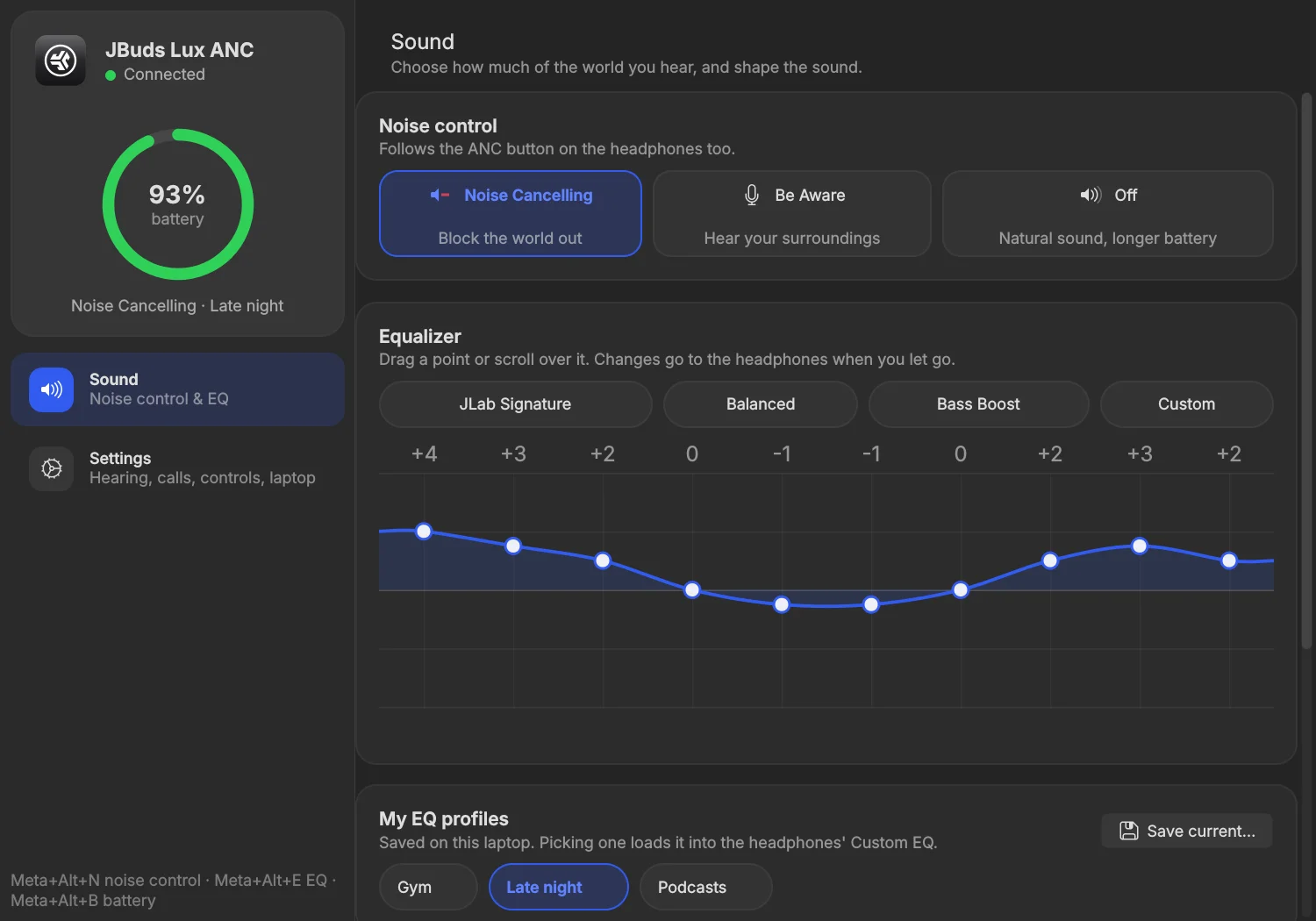
The app: BlueZ opens the RFCOMM socket. A Profile1 client is registered for the SPP UUID and Device1.ConnectProfile is called, so A2DP/HFP audio is never interrupted. A background service (jlab-budsd, a D-Bus-activated systemd user unit) owns the connection, reconnects with backoff, polls battery, and publishes its state over D-Bus. The PySide6 + Kirigami app has a live battery ring, Noise Cancelling / Be Aware / Off, a draggable 10-band EQ graph with presets and saved profiles, volume limit, Clear Voice, spatial audio, touch controls, voice prompts and which modes the ANC button cycles through. A jlab-buds CLI does the same from the terminal, and Meta+Alt+N / E / B cycle noise mode, cycle EQ or show battery with an on-screen display.
I kept a strict list of what is never sent: OTA firmware opcodes, reboot, factory reset and JLab's “clear pair record”. Everything in PROTOCOL.md is documented from the decompiled source and confirmed against the real device.
Decompile
JADX on the JLab Android app identified a JieLi chip speaking RCSP over classic Bluetooth SPP.
JADX · APK
Emulate
The native auth library ran in Unicorn, which revealed Bluetooth E1 / SAFER+ with a fixed key.
Unicorn · ARM64
Reimplement
Pure-Python SAFER+ handshake and RCSP framing, tested against the emulator and live device bytes.
auth.py · rcsp.py
Connect
A BlueZ Profile1 client for the SPP UUID hands over the RFCOMM socket without interrupting audio.
BlueZ · D-Bus
Control
A D-Bus service owns the link. The KDE app, the CLI and the global shortcuts all talk to it.
systemd · PySide6 · Kirigami
- Decompiled the JLab Android app (JADX) and mapped the JieLi RCSP protocol: framing, opcodes, attributes
- Emulated the native ARM64 auth library in Unicorn to identify Bluetooth E1 / SAFER+ with JieLi's fixed key
- Pure-Python SAFER+ authentication that matches the native library 20/20 and the live device
- BlueZ Profile1 SPP transport that never interrupts A2DP / HFP audio
- Native KDE app: battery ring, ANC modes, draggable 10-band EQ, saved profiles, every hidden setting
- D-Bus-activated systemd service with reconnect backoff, low-battery notifications and live state
- CLI (jlab-buds anc|eq|set|profile) and global shortcuts with on-screen display
- Written protocol spec (PROTOCOL.md) with a do-not-send list for firmware, reset and pairing opcodes
The section above says what this does. This one says why it is built the way it is — including the parts that did not come free.
- Run the library's own E1 function in the Unicorn emulator and treat it as an oracleoverDisassemble and port it instruction by instructionReplay a captured handshakeBecause
Feeding it chosen inputs showed it was standard Bluetooth E1 (SAFER+) with a fixed key. That made a clean Python reimplementation possible, testable against the oracle and against live device challenges. Replays fail because the challenge is random every time.
What it costMalloc, free and the stack guard had to be stubbed by hand so the emulated code could run outside Android.
- Register a BlueZ Profile1 client for the SPP UUID and let BlueZ hand over the socketoverOpen a raw RFCOMM socket on a guessed channelBecause
BlueZ does the SDP lookup and manages the channel alongside A2DP/HFP, so music keeps playing while settings change.
What it costIt needs a GLib main loop thread for dbus-python next to the Qt event loop.
- One D-Bus-activated service owns the link; every client talks D-BusoverEach client opens its own Bluetooth connectionBecause
The headphones accept a single control channel. A service serialises commands, keeps state in one place, and starts on demand when any client calls it.
What it costOne more moving part to install: a systemd unit and a D-Bus activation file.
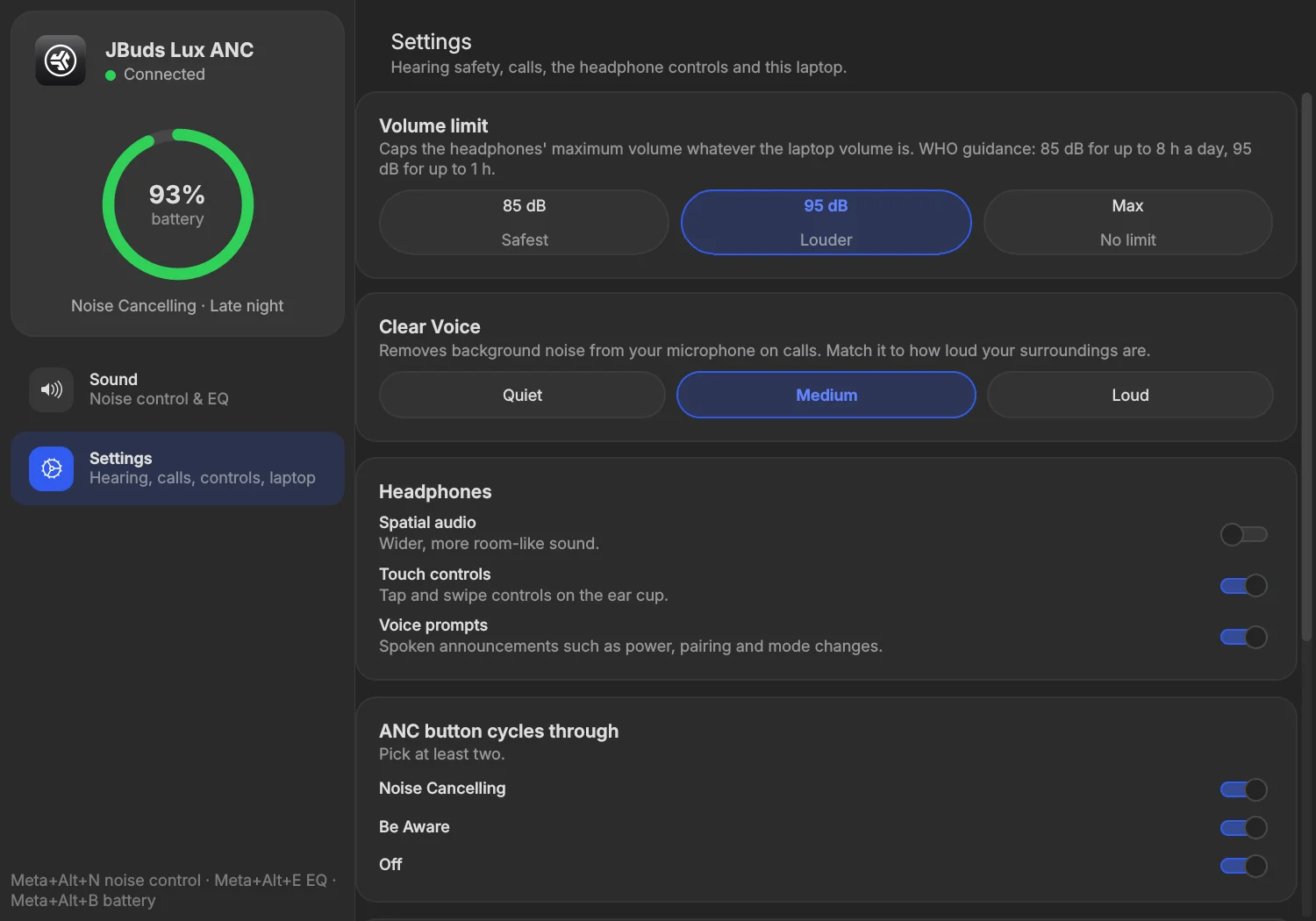
01 / 02Sound — noise control, 10-band EQ, profiles
open full size ↗Seen enough?
There are more where this came from — or skip the browsing and just say hello.